
Most partner portals are a login page and a folder of PDFs. The partner portal features that keep partners active, and a five-email test to audit yours.
Most Companies Have a Partner Portal Login. Few Have a Partner Portal.
Ask a partner when they last logged into your portal.
Then ask how they last sent you a referral.
The first answer is usually "during onboarding". The second is an email, a LinkedIn message, or a WhatsApp to your partner manager at 9pm on a Sunday.
That gap is the whole problem. Your partner portal exists. Partners just don't need it for anything they care about, so they stop coming back, and the program quietly moves into one person's inbox.
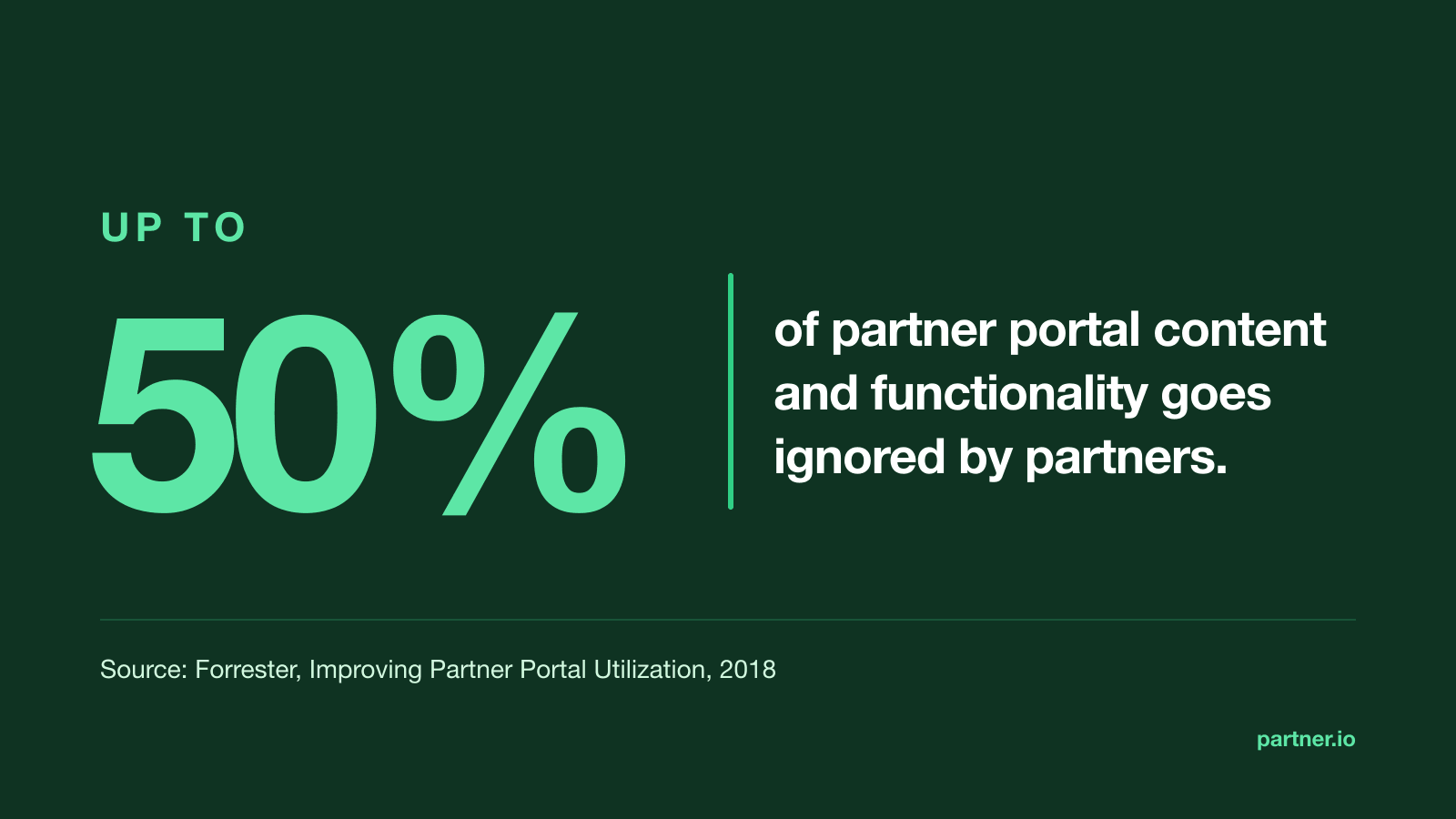
This isn't new. Forrester found back in 2018 that partners ignore up to 50% of supplier portal content and functionality, and that plenty of partners don't use supplier portals at all. Log into three vendor portals today and count how many tell you anything about your own deals.
Why most partner portals sit empty
Most portals are built backwards. They start from what the vendor wants to publish, not from what the partner needs to find out.
So you get a login page, a folder of logos, last year's pitch deck and a form that emails your partner manager. Everything a partner wants to know lives somewhere else:
Deal status lives in your CRM, where partners can't see it.
Commission lives in a finance spreadsheet.
The agreement lives in someone's inbox.
Training lives in a Google Drive link nobody has opened since March.
A partner logs in once, finds nothing that answers their question, and goes back to email. Your partner manager becomes the portal.
The portal is also one size for everyone. In Forrester's 2023 partner marketing survey, only 33% said a supplier's partner systems are personalised by partner demographics. So a consultant who refers one deal a year usually sees the same screens as a reseller closing fifty.
And there's often nobody whose job it is to fix it. In the 2022 State of Partner Ops and Programs report from HubSpot, Canalys and Partnership Leaders, 40% of organisations had no full-time partner operations staff.
"Partners don't want another portal"
This is the strongest argument against everything in this post, and it deserves a straight answer.
Partners already juggle a lot of vendors. Forrester's partner onboarding research notes that most partners handle more than eight product lines, and every one of those vendors wants a login.
Some analysts now argue the portal is on its way out. Writing in November 2026 about AI agents that talk to vendor systems directly, Futurum's Alex Smith put it bluntly:
“Partners no longer need to navigate a proprietary, separate vendor portal to log a lead or retrieve marketing collateral.
”
Asking a partner to remember one more URL and one more password is a real cost. That's why some vendors have gone headless and let partners register deals from Slack or their own CRM instead. We looked at that model in Headless PRM or a Partner Portal?
The objection is right about friction. It's wrong about the cure.
Partners don't avoid portals. They avoid portals that give them nothing back. A partner will happily log in to see that a $40k deal moved to Closed Won and the commission pays on the 15th. Nobody logs in to download a logo again.
A Slack message or an AI agent is also an interface, not a record. The same Futurum piece notes that the protocol behind those agents "does not handle cross-organizational authentication, identity, or trust." Someone still has to hold the deal status, the agreed commission, the signed agreement and the tax form. The real question is whether partners can see all of that without asking a person.
So cut the friction and keep the portal. Sign-in by magic link instead of a password. Referral pages that need no login at all. Notifications that bring partners back when something changes.
The Five Emails Test: partner portal features that matter
Here's the simplest way to judge a partner portal: count the emails it stops.
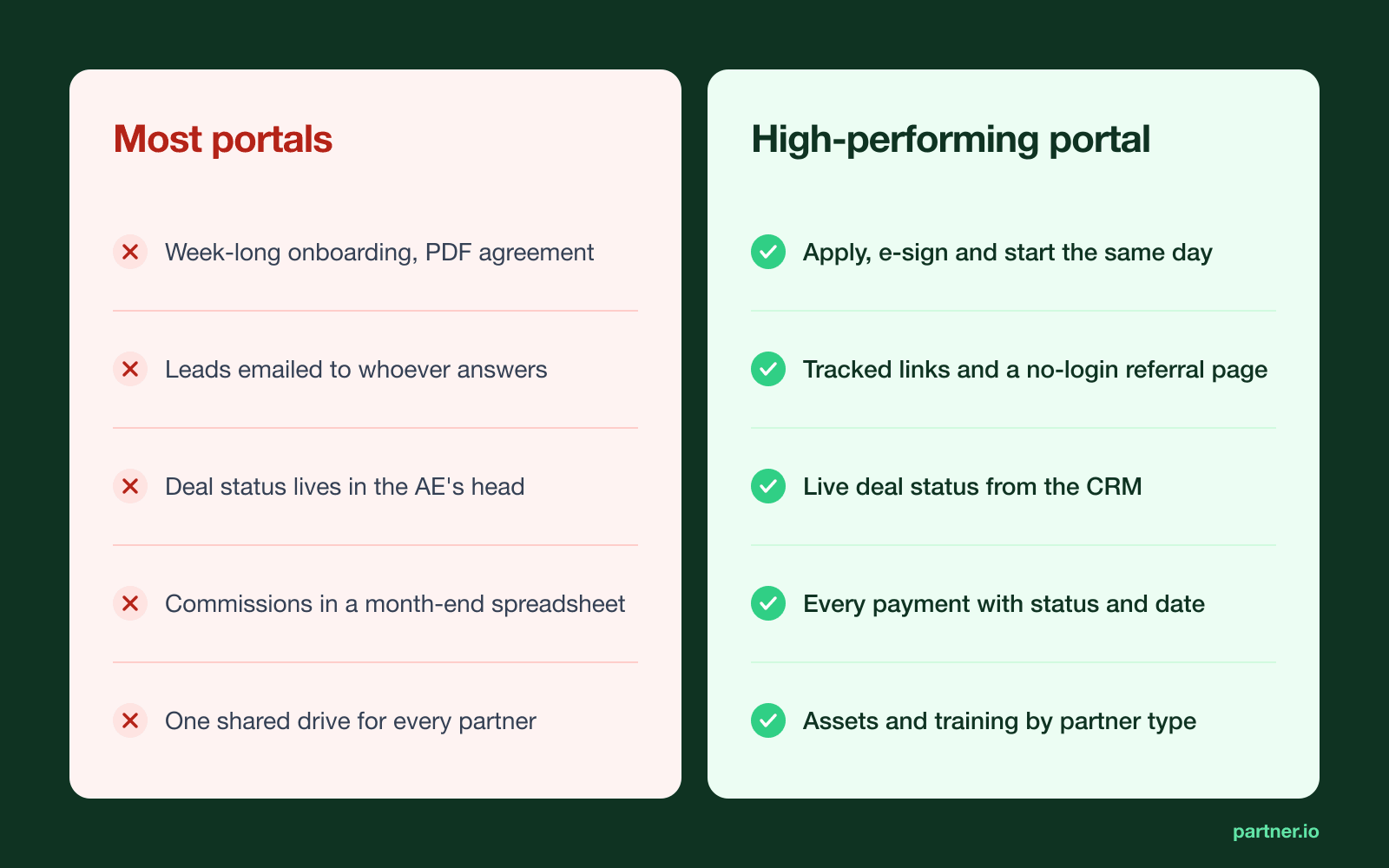
Every partner program produces the same five emails, whatever the partner type. A high-performing portal answers each one before the partner thinks to send it. We call this the Five Emails Test.
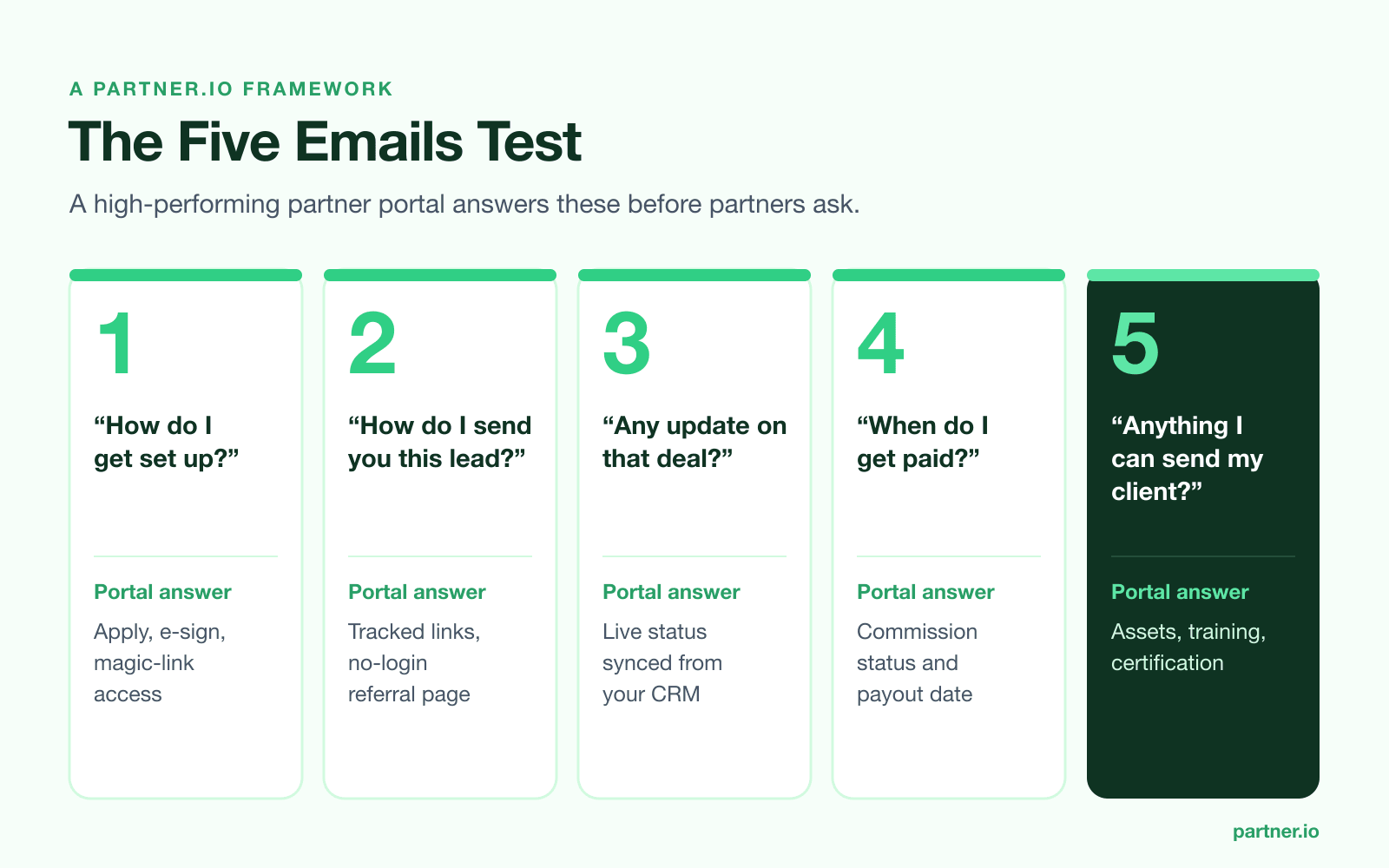
Email 1: "How do I get set up?"
What fails: a partner applies through a website form, waits a week for an intro call, receives a PDF agreement to print, sign and scan, then gets login details that land in spam.
What works: one application form that asks only what you need, an agreement they e-sign inside the portal, and access by magic link. A referral partner should go from application to first referral in one sitting.
Speed here matters more than it looks. Forrester's onboarding research warns that if a new partner doesn't start actively selling within the first 90 days, it "most likely never will". Our partner onboarding guide covers the order of steps.
Email 2: "How do I send you this lead?"
What fails: partners email a prospect's details to whoever they last spoke to. Half the fields are missing, and nobody logs it for two days.
What works: a referral form with exactly the fields your sales team needs, plus a tracked link for every rep. Add a quick-refer page with no login, so a consultant can pass an introduction from their phone between meetings. Agencies and resellers need deal registration on top, with written rules on who owns the account. The deal registration guide has a starting set.
Email 3: "Any update on that deal?"
This is the email that kills programs.
What fails: the partner's only window into the deal is your AE. AEs reply slowly because the partner doesn't carry their quota. After three weeks of silence, the partner decides the referral vanished and sends the next one to someone else.
What works: every lead and deal the partner sent, with live status from your CRM, deal value and a message thread on each. When your AE moves the deal in HubSpot or Salesforce, the partner sees it without anyone typing an update.
Partners notice, and they leave. CompTIA's 2022 partner experience research found that 50% of channel firms had dropped a vendor in the previous two years because of poor partner experience.
“Smart vendors are constantly looking for ways to proactively build partner interest and loyalty.
”
Email 4: "When do I get paid?"
What fails: commissions worked out in a spreadsheet at month end and paid by bank transfer, with nothing the partner can check. Every payment raises a question, and every question costs a little trust. We counted that cost in the hidden cost of managing partners in spreadsheets.
What works: every commission with its amount, status and payout date, paid from the same system, with tax forms collected once and stored. A partner who can see the money coming refers again. If you're still choosing a model, here are nine SaaS partner commission structures with the maths.
Email 5: "Have you got anything I can send my client?"
What fails: a shared drive with forty files, half out of date, identical for every partner.
What works: an asset library filtered by partner type, courses that save progress, and certificates partners can share. Show tier status and its perks too, so partners can see what doing more gets them. The partner enablement guide goes deeper.
“If your partner manager is still the fastest way to get an answer, your portal has failed the test.
”
Want to run the Five Emails Test on a real portal? Try Partner.io free for 7 days, no credit card needed.
How to audit your partner portal in an afternoon
You don't need a survey or a consultant. You need last month's inbox.
- Export 30 days of partner emails and Slack messages from your partner team.
- Tag each one against the five emails. Tag anything else "other".
- Count the piles. The biggest one is your first fix.
- Sign in as a test partner and try to answer each email from the portal alone. Time it.
- Ask three active partners and three quiet ones: "What would make you log in once a week?" Weight the quiet ones' answers more.
- Fix one thing, then run the count again next month.
One portal, or one per partner type?
Run more than one partner type and you'll be tempted to build separate portals, or to show everyone everything. Both fail.
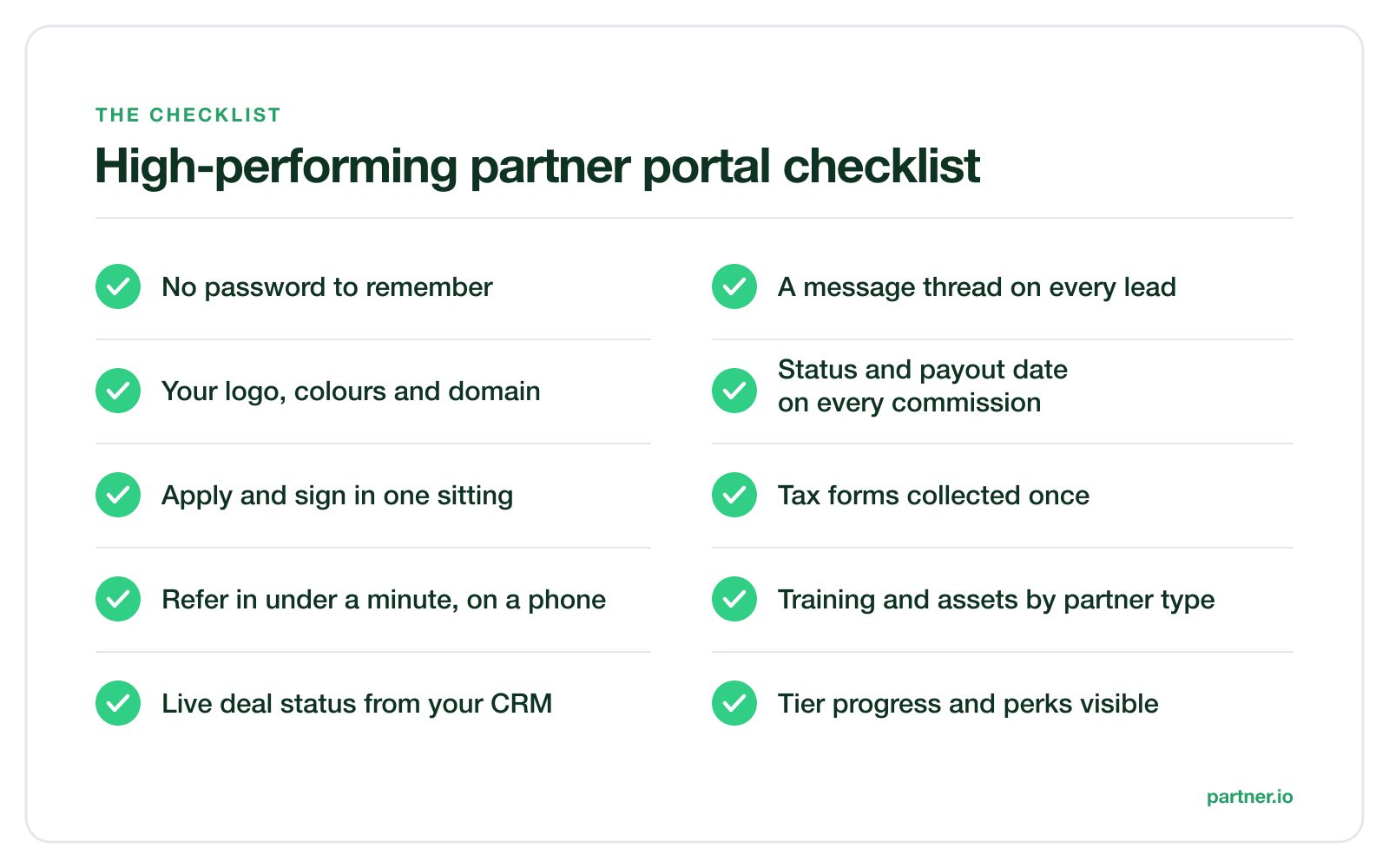
If your partners are mostly referral partners (consultants, customers, advisors), keep the portal to three jobs: refer, track, get paid. Hide deal registration, training and anything else they won't use. Every extra tab is a reason to leave.
If you run agencies or resellers who own the customer relationship, they need deal registration, a pipeline view, training and certification, and the ability to manage their own reps.
If you run both, use one portal where sections appear by partner type. One URL, one login, different views. We set that up step by step in how to run referral, reseller and agency partners in one program.
The other decision is where the portal comes from:
| Option | Cost to start | Where it breaks |
|---|---|---|
| Web pages and forms | Close to zero | No status or payouts, so your team answers everything |
| Custom build on your CRM | Months of dev time | Every program change waits for a developer |
| PRM with a branded portal | A monthly fee | Only as current as your CRM |
That last row is the trade-off to take seriously. A portal shows partners what your CRM knows. If AEs don't update deal stages, partners see stale status, and stale status is worse than none because it looks like you're ignoring them. Fix CRM hygiene for partner deals before you launch.
When a partner portal breaks
Most failing portals show the same symptoms. Match yours below.
What this looks like in the real world
Salesfire is a 70-person UK company that sells conversion rate optimisation software to e-commerce retailers. More of its new clients were arriving through recommendations from digital agencies, and the referral process hadn't kept up.
Referrals, partner contacts and commission calculations all lived in Google Sheets. Once more than ten partners were involved, things fell through the cracks. Partners had no view of deal status, no access to marketing material or training, and payouts were worked out and sent by hand.
Every one of the five emails, in other words, went to a person.
Salesfire moved the program into a branded Partner.io portal connected to HubSpot, Slack and Stripe, with co-branded quick referral pages that need no login. Since then it has onboarded more than 120 partners in 12 countries, and partner referrals are up 320%.
“Seeing partners log into the portal and start sending referrals on their own was the moment we knew we'd made the right choice.
”
"On their own" is the point. The portal started answering the emails.
Where Partner.io fits
We built Partner.io to pass the Five Emails Test for SaaS teams that don't have a partner ops department.
- Get set up. A branded partner portal on your own domain, with magic-link sign-in, an application form you compose and agreements partners e-sign before they start.
- Send a lead. A tracked link for every rep, quick-refer pages with no login, and lead and deal registration synced to HubSpot, Salesforce or Pipedrive through our integrations.
- Get an update. A board of every deal the partner is working, from New to Closed Won or Lost, with a message thread on each.
- Get paid. Commissions and payouts through Stripe Connect, with status on every payment and W-9s collected by tax compliance.
- Sell more. Training and certification with shareable certificates, plus files and folders you can limit to particular partners.
Sections appear only when your program uses them, so a referral-only program stays simple and a reseller program shows deals and training. Automation handles the nudges your partner manager doesn't have time for.
Run the Five Emails Test this week
Your partners have already told you what your portal is missing. It's sitting in your partner manager's inbox.
Count those emails. Then put a portal in place that answers them first.
Try Partner.io free for 7 days → No credit card, no setup fee, cancel anytime.
Prefer a walkthrough first? Book a demo and we'll map it to your program.
- [prm]
- [partner-led-growth]
- [referrals]
Published November 23, 2026